
Using AXISCore concepts
Allowances and your funds
Your tokens stay in your wallet until a trade settles. An allowance lets the AXIS contract move only what your own orders and trades need.
Your funds stay in your wallet#
AXIS never takes custody of your tokens. Placing an order moves nothing: the order is a record in the AXIS contract, while the tokens stay in your wallet. Tokens move only when a fill happens, all within one transaction: the contract collects what you sell from your wallet and passes it to the taker, who pays you directly. No AXIS call leaves tokens in the contract, so there is no pool of user deposits that could be drained or frozen. Tokens sent to the contract address directly, outside AXIS calls, cannot be recovered.
To settle a fill of your order while you are offline, the contract needs your permission in advance. That permission is an allowance.
What an allowance is#
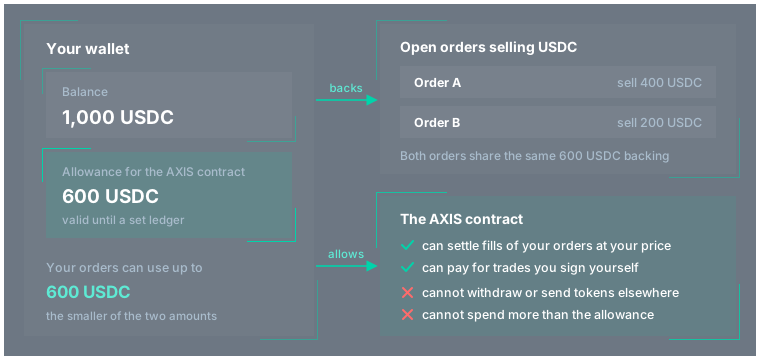
An allowance is a standard feature of Stellar tokens. You sign an approval that says, in effect, "the AXIS contract may move up to this amount of this token from my account until this ledger". It has three parts:
- The token. Each allowance covers one token, for example USDC. You need one for each token you sell.
- The amount. The most the contract can move in total. Each fill reduces it by the traded amount. A new approval replaces the amount, it does not add to it.
- The expiry ledger. A new ledger closes about every 5 seconds. After the expiry ledger the allowance reads as zero and has to be granted again. The longest possible standing allowance lifetime is about 180 days.
What the contract can and cannot do#
With your allowance, the AXIS contract can:
- Settle fills of your own open orders, at your order's price or better for you
- Pay for trades and swaps that you signed yourself, within the limits you signed
It cannot:
- Move more than the allowance, or anything after the allowance expires
- Take more of your tokens than a fill at your own price, or a trade you signed, requires
- Touch a token you did not approve
- Transfer your tokens to other wallet or spend them in any way not defined by the contract code
- Spend the allowance while trading is frozen
- Grant AXIS developers or any other third-parties access to your tokens
The contract's safety admin has no instruments to use your allowance (see Security and trust).
How the AXIS app grants it#
The AXIS app and the JS client manage allowances for you:
- Same transaction, one signature. The approval travels inside the order or swap transaction, so you sign once.
- Just enough. The amount is what the new order or swap can spend plus the remaining amounts of all your open orders that sell the same token, across every market.
- About 30 days. Each approval lasts 518,400 ledgers, about 30 days.
- Only when needed. If your current allowance already covers everything and has more than about a day (17,280 ledgers) left, no approval is added. Otherwise, your next order or swap that sells the token renews it.
The app does not revoke your allowance. Canceling orders leaves it unchanged. It shrinks only as fills spend it, or when a later approval sets a new amount.
Expiry and renewal#
When an allowance expires, it reads as zero. Every order selling that token becomes unbacked at once. The orders stay listed, but their fills are skipped and the AXIS app tags them "0% backed". Your tokens are not affected.
The AXIS app renews an allowance with your next order or swap that sells the same token, once less than a day is left, or after it has expired. The fresh approval covers all your open orders selling the token. To restore an expired allowance in the app, place a new order selling that token, or cancel one of your orders and place it again.
Spending your tokens elsewhere#
Your tokens are never locked, so you can send them, trade them elsewhere or use them in other apps at any time. If you receive any benefits from holding a token (LP commissions, yield, etc.), it stays with you. Your AXIS orders do not adjust automatically:
- Orders whose backing is now short become partially backed. Fills they cannot cover are skipped, and the orders stay on the book unchanged until you cancel them or top up.
- The AXIS API counts only the backed part of each order in depth and quotes, so other traders do not see liquidity you cannot deliver.
- When you add tokens again, your orders become fillable again.
Revoking an allowance#
To withdraw the permission, set the allowance on the token to zero: an approval for the AXIS contract with an amount of
0, made with a wallet or tool that can call the token's approve function. An allowance also ends by itself at its
expiry ledger.
Tip
Cancel your open orders before you revoke. Revoking alone leaves the orders on the book with no backing, so they cannot fill but still there and display your account as a maker counterparty.
Developers can find the exact settlement rules in Settlement and allowances.